Reach your home, office or car from wherever you are.
For homes and businesses
Your world. Connected.
Meet Aria, your personal AI home assistant. Talk naturally, get help with everyday questions and control compatible devices through one connected experience. CAOSConnect brings voice assistance and smart-home technology together for homes, families and businesses.
Built for everyday spacesFamilies & kidsHome officesWorkshops & small businessesHospitality & rentals
Meet Aria
Your home, connected through Aria.
One voice for the devices around you and the help you need through the day. Ask the way you’d ask a person. Aria works out what you mean, does it and tells you what actually happened.
01
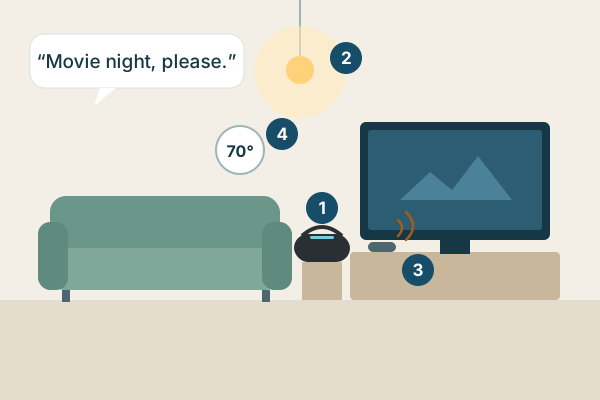
“Movie night, please.”
One request, and the room is ready.
Aria hears you from across the room.
The lights dim, and Aria checks that they really did.
The TV comes on. When you start talking to Aria, it mutes itself and comes back afterwards.
The temperature adjusts on a compatible thermostat.
Lighting
On, off or dimmed, one room or several. Aria says “done” only after the light reports its new state.
Temperature
“Make it a little warmer.” Aria sets compatible thermostats and air conditioners and reads back the new setting.
TV and entertainment
Power, volume, channels and inputs, including TVs that only have an infrared remote.
Personal assistance
Questions answered with a live web lookup, the time and weather, timers, and a conversation that picks up where you left off.
Learning and homework
Help that teaches, with hints and guiding questions at a child’s level, with a short summary for a parent.
Family routines
School mornings, chores and bedtime announced in the right room, with adults deciding what children can change.
If a device can be controlled by its app, its remote or another system, we can connect it to Aria. Where no driver exists, we write one. Device support depends on the model, its integration and any required hub or adapter. We check compatibility before recommending your setup.
Everything you expect from a home assistant
A wake word, “Hey Aria”, and natural back-and-forth conversation
Lights, TV, temperature and blinds by voice
Answers to questions from a live web lookup
Time, weather, timers and reminders
Requests passed to the right person, with their status when you ask
A clear “goodbye”, and Aria goes back to listening for her name
And what most of them don’t do
Remembers you: your name, your preferences and what you talked about yesterday
Checks a device really changed before saying “done”, and says plainly when it can’t tell
Never claims an action she didn’t take
When a device has no driver yet, we write one
Set up and looked after for you, so there’s no server to build
Looking for help for older adults in senior living? That is our separate application, CAOSCare.
Getting started
Your assistant. Your devices. One place.
We’re building a complete voice-first experience that brings compatible devices together through Aria. Our goal is to handle the technical setup so you don’t have to build a Home Assistant server, flash firmware or manage separate configuration tools. Talk naturally, control your space and get help from one everyday interface.
Others already offer managed smart-home systems and voice assistants. We’re not claiming to be the first. Our aim is to make the experience simpler and more personal.
Bring the devices you have
Tell us what’s in your home: lights, TV, thermostat, speakers. We check each model, connect the compatible ones to Aria and test every one before we hand it over.
Or choose a package we configure
A speaker set up for Aria, a small hub we look after for you, and the compatible devices you want, paired and tested before they reach you.
Wake word, microphones and a mute button ready to go. You can also use a compatible speaker you already own.
A hub we look after
A small box in your home that we set up, update and back up remotely. It runs open-source Home Assistant and handles local connections such as Matter.
Your devices, connected
Each compatible device paired and tested. Some brands still need their own app or account once, for example to share a pairing code.
A person to call
Help when something stops working, and a way to ask for devices we don’t cover yet.
Example packages
Living room
Speaker and hub
Lights
TV, including infrared-only sets
A compatible thermostat or air conditioner
Family home
Everything in the living room
Speakers in the rooms where the day happens
Family profiles and homework help
Home office or small business
Speaker and hub
Lights and climate
Hands-free questions while you work
Front-desk or team notifications
See prices and options in Hardware & Products, or email us and we’ll recommend the package that fits.
How setup works
Add a device. See it work.
Setup is where most connected homes stall. Ours ends with a real test, not a guess, and when a device has no driver yet, we write one.
Find it
Devices on your network and in accounts you choose to link, or the brand and model from the label.
Identify it
Matter, Wi-Fi with the maker’s app, Zigbee or Z-Wave through a radio adapter, or infrared.
Match a driver
A published integration for that exact model, or one we write when the device can be controlled another way.
Pair it
The model’s own steps: a pairing code, the maker’s sign-in and the permissions you grant.
Test it
One safe command, then a check of what actually happened. Only then does the device count as set up.
Set up by asking. “Hey Aria, let’s set up my home,” and Aria walks you through each step. A phone is still needed once for Wi-Fi and for some brands’ pairing codes.
No firmware flashing. We use each device’s normal pairing and the maker’s own app or API. We never ask you to replace or modify a device’s software.
Device not on the list? Ask us.
Send the brand, the exact model number from the device’s label, the app it uses today and what you’d like Aria to do with it.
We check whether a published integration exists for that model and reply with what we found.
If no driver exists yet, we tell you whether we can write one.
Please don’t send passwords, account details or anything showing your address.
You ask from whatever is nearby. Aria works out what you mean, checks what you’re allowed to do and sends the request through an integration your equipment supports. Then she tells you what actually happened.
1 You ask
A speaker in the room
A screen with tap to talk
Your phone, through the app
2 Aria · CAOSConnect
Understands the request
Checks who is asking and what they may control
Asks you to confirm before sensitive actions
Remembers your preferences
3 Integrations
Matter and Home Assistant
Manufacturers’ official apps and APIs
Infrared for remote-controlled equipment
Radio adapters where needed
4 Your equipment
Lights
Thermostat
TV & media
Appliances
Other devices
Confirmation where available. Aria says “done” only when the device reports its new state. When a device can’t report back, as with infrared, she says the command was sent and asks whether it worked.
For every age
Help for every part of the day.
For kids, families and working adults. Anything that spends money, sends a message for you or changes a family rule waits for the right person’s approval.
K
Kids and teens
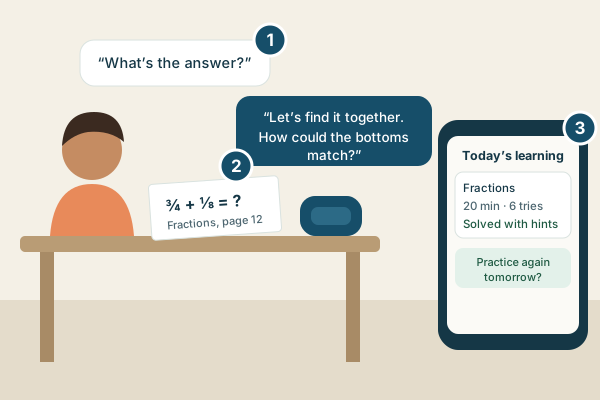
Homework help that teaches
Aria helps kids learn rather than handing over answers.
A child asks for help with a problem.
Aria answers with a guiding question or a hint at the child’s level, and explains the idea another way if needed.
A parent sees a short summary of what was practiced.
A parent sets up and supervises a child’s use.
F
Families
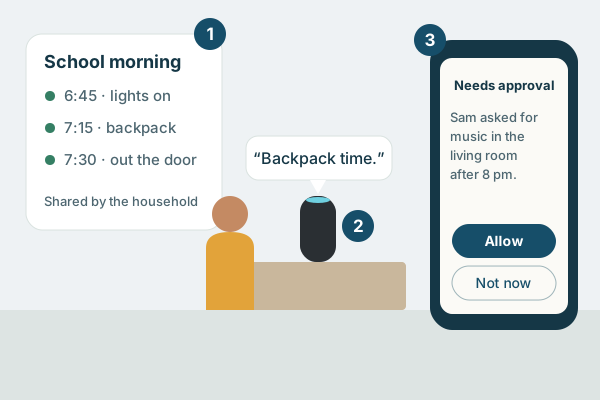
Family routines and reminders
Shared routines and reminders on phones or room speakers, with adults deciding what children can do.
A household routine everyone can see.
A reminder spoken in the right room.
Children’s requests can need an adult’s approval.
A
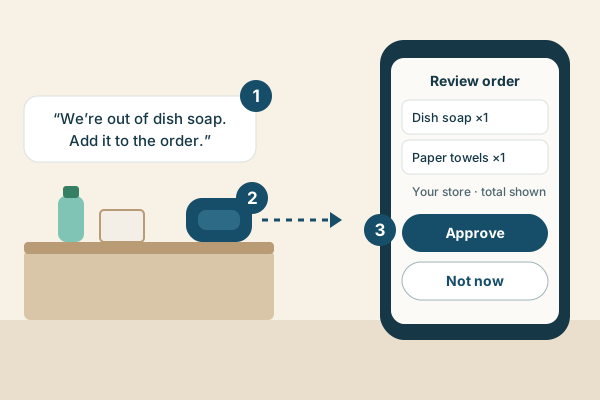
Shopping lists and orders
Keep a running list by voice and get a ready-to-check order.
Ask from any room.
Aria adds items to an order at a store you choose.
Nothing is bought until you approve the items and the total.
Works with stores that offer an ordering integration. Payment details stay with the store.
B
Adults at work
Your workday, by voice
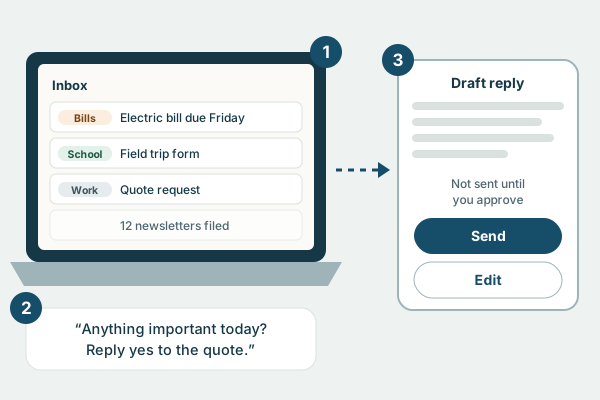
Hear what matters in your inbox and calendar, and dictate replies.
Messages sorted into folders such as bills, school and work.
A spoken run-through of your day.
Drafts wait. Nothing is sent until you approve it.
Connects through your mail provider’s official sign-in, with your permission.
C
Screen-time routines
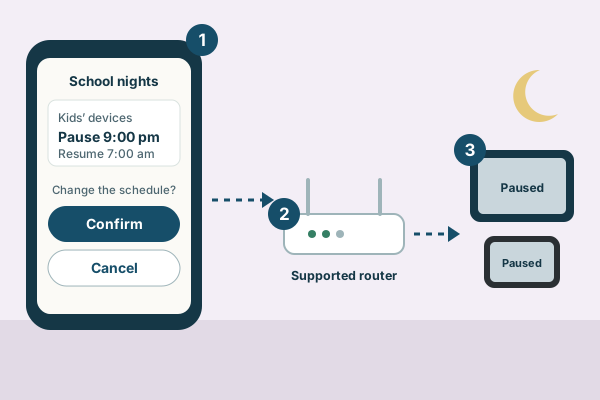
Set school-night internet schedules by asking.
An adult asks for or changes the schedule and confirms it.
A compatible router applies it.
Children’s devices pause and resume on time.
Works with routers whose controls offer a supported integration.
D
Connected appliances
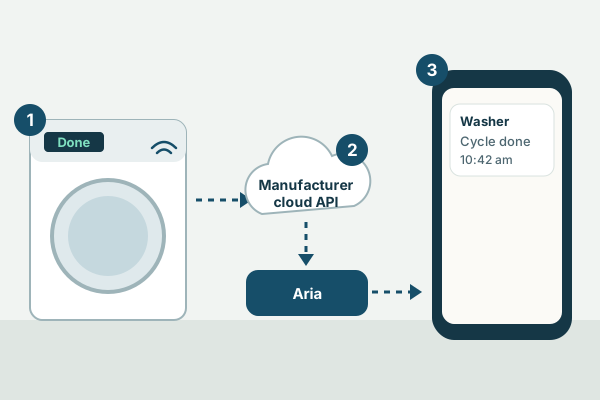
“The washer is done” as a notification or a spoken announcement.
A Wi-Fi washer set up in its maker’s app.
The manufacturer’s official integration, such as LG ThinQ or Samsung SmartThings for supported models.
Aria lets the right person know.
Features vary by model and region. We have no brand partnerships.
E
Work and business
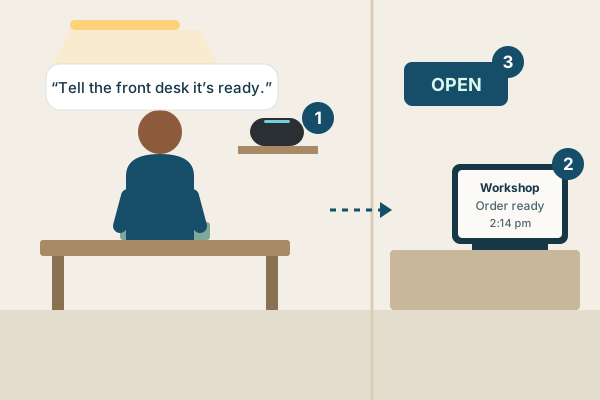
Hands-free requests that reach the right person across an office, workshop or front desk.
A request while your hands are busy.
A notification that reaches the right person.
Compatible lights and signs.
Builds on the request routing that already runs in our sister app, CAOSCare.
Hardware & Products
Use what you have. Add only what helps.
Most homes need nothing beyond a speaker and the hub. These add-ons are for equipment that needs them.
Ways to talk to Aria
Room speakerphone
A conference-style speakerphone with the “Hey Aria” wake word, for hands-free conversation across a room.
Satellite1
A finished smart speaker made by FutureProof Homes, for hands-free voice control across a room.
Made by FutureProof Homes, not CAOSConnect.
Your phone
Reach Aria from your phone at home or away.
Open Aria and tap to talk. Phones don’t let apps listen for a wake word in the background.
Add-ons for your equipment
IR blaster
Lets Aria control equipment that uses an infrared remote, such as many TVs and air conditioners.
Needs a line of sight. Infrared can’t report back, so Aria says the command was sent and asks.
Protocol radios
Zigbee, Z-Wave or Thread adapters, added only when your devices use them.
Many homes need none. Matter over Wi-Fi needs no extra radio.
RTL-SDR receiver
A radio receiver that listens for supported signals, such as some wireless buttons and sensors with open decoders.
Receive-only. It doesn’t transmit and can’t control other devices.
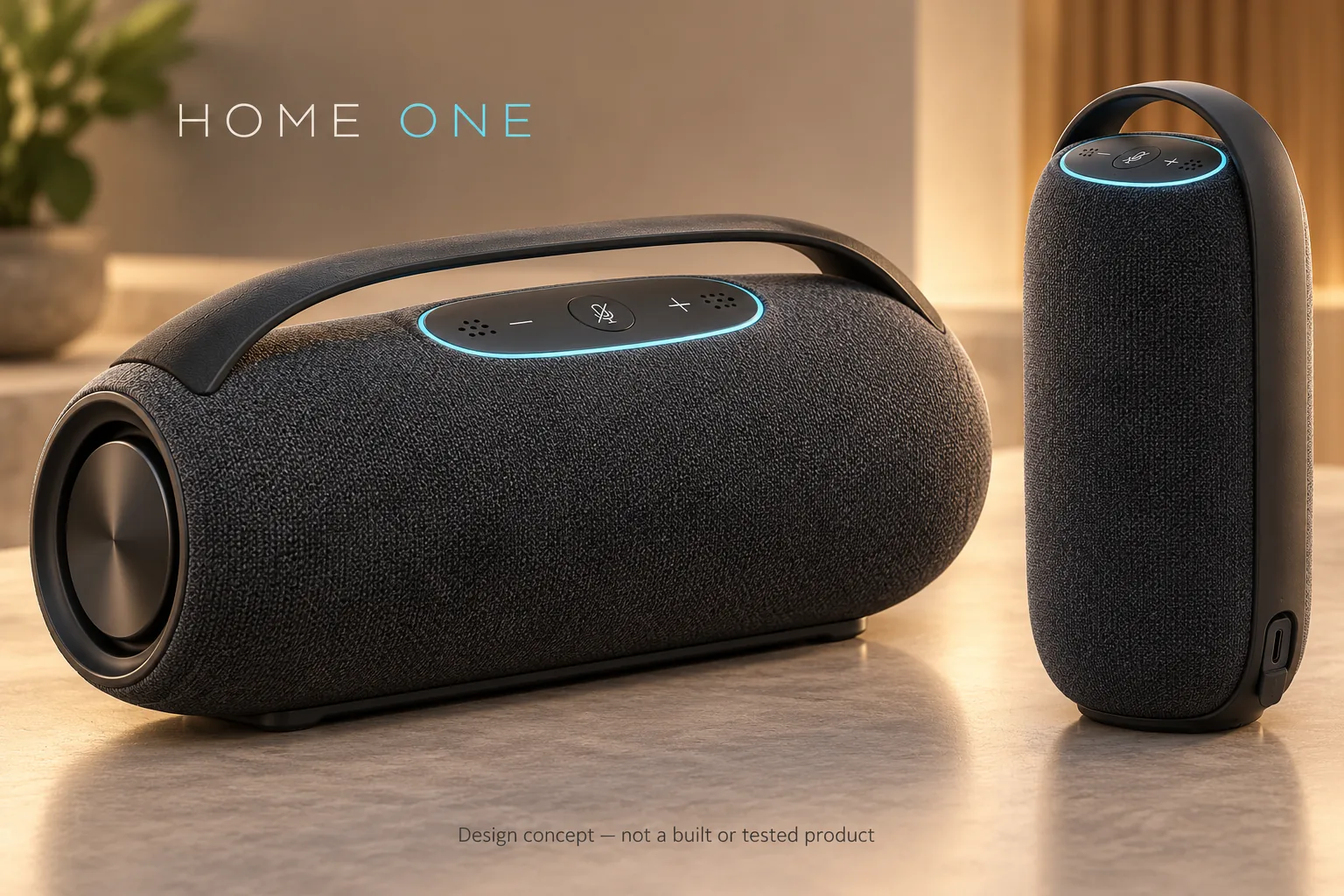
Original designs we’re exploring for people who want a dedicated unit. You’ll never have to buy one to use Aria.
Design concepts. No unit has been built or offered for sale. The pictures are renders, and sizes, features and prices are not final.
Concept · Horizontal
Home One
A portable speaker with a handle for the kitchen, patio or shop floor. It has a lit control strip and a microphone you can switch off with one press.
Concept · Upright
Home One, upright
The same design stood on end, for a smaller footprint on a shelf, nightstand, counter or front desk.
One unit, with optional modules
A future unit could combine microphones, a speaker and the hub in one, with radio modules added only where your equipment needs them. Which modules go in depends on cost, power, heat and reliability testing.
A practical starting point
Start with your space. Keep what you have.
The goal is to work with the lights, TVs, appliances and devices you already own rather than replace everything. Every setup begins with a conversation about what would actually help.
We’re starting with homes and local businesses in Conway and the surrounding area.
Tell us about your home or business and the devices you already have. We’ll recommend a setup of compatible devices and the package that fits.
Looking for senior living? That is our separate application, CAOSCare.
Good questions to start with
Will it work with the devices I already own?
Device support depends on the model, its integration and any required hub or adapter. We check compatibility before recommending your setup.
Do I have to buy your hardware?
No. Compatible speakers and devices you already own are an option. Home One is a design concept with no price or release date.
Is it a security or emergency system?
No. CAOSConnect is not an alarm, emergency response, monitoring or medical service. Keep your existing security and emergency arrangements in place.
How is CAOSConnect related to CAOSCare?
CAOSCare is our separate senior-care application. CAOSConnect is for homes and businesses. They share engineering work, but linking the two sites does not share data between them.
How do I ask for a demo or discuss a partnership?
Email caosconnect@gmail.com with your general interest and the type of home or business you have in mind. Please do not include passwords, account numbers or other sensitive personal data.
Let’s make it useful
What would you like your home to do for you?
Start with a conversation. We welcome demo requests from households and businesses, practical feedback and introductions to potential partners.